Guide
How to write a thesis in LaTeX on your computer
Set up a LaTeX thesis that stays easy to build: folder layout, a main.tex skeleton, a bibliography that works, local compiling and backups.
- Nebula Writer Team
- October 14, 2026
- 5 min read
A thesis in LaTeX stays manageable when each chapter is its own file, one main file pulls them together, and one .bib file holds every reference. Set that up on day one, compile on your own computer so a long document never runs into a hosted time limit, and keep a backup that lives somewhere other than your laptop.
This guide gives you a folder layout, a minimal main.tex, a bibliography setup and a routine for compiling, checking and backing up. If your university has a thesis class or template, start from it and keep the same layout.
Folder layout
thesis/
  main.tex
  references.bib
  chapters/
    01-introduction.tex
    02-background.tex
    03-methods.tex
    04-results.tex
    05-discussion.tex
  figures/
    study-area.pdf
    results-by-depth.pdf
  frontmatter/
    abstract.tex
    acknowledgements.tex
Only main.tex has \documentclass and \begin{document}. Chapter files hold text only. Keep figures as PDF for plots and diagrams, and JPEG for photographs.
A minimal main.tex
\documentclass[12pt,a4paper]{report}

\usepackage[T1]{fontenc}
\usepackage{graphicx}
\graphicspath{{figures/}}
\usepackage{booktabs}
\usepackage{amsmath}
\usepackage[style=authoryear,backend=biber]{biblatex}
\addbibresource{references.bib}
\usepackage{hyperref}

\title{Cover Crops and Soil Carbon}   % example title
\author{Your Name}

\begin{document}
\maketitle
\include{frontmatter/abstract}
\tableofcontents

\include{chapters/01-introduction}
\include{chapters/02-background}
\include{chapters/03-methods}
\include{chapters/04-results}
\include{chapters/05-discussion}

\printbibliography
\end{document}
Each \include starts a new page, which suits chapters. While you work on one chapter, add \includeonly{chapters/04-results} to the preamble. LaTeX then builds only that chapter but keeps page numbers and cross-references from the last full build. Remove the line before you print.
Use \input instead of \include for pieces that should not start a page, such as a long table.
The bibliography
Pick one setup and stay with it.
| Setup | In the preamble | Tool that builds it |
|---|---|---|
| biblatex | \usepackage[backend=biber]{biblatex} and \addbibresource{references.bib} | Biber |
| natbib | \usepackage{natbib}, then \bibliographystyle{plainnat} and \bibliography{references} where the list goes | BibTeX |
biblatex is more flexible with styles and non-English sources. natbib is what many journal and university templates still use. If your template already loads one, keep it.
Cite with keys, for example \parencite{smith2024deep} with biblatex or \citep{smith2024deep} with natbib. If citations show as [?], the bibliography tool has not run yet; see common LaTeX errors for the full sequence. A reference manager such as Zotero with Better BibTeX can keep references.bib up to date for you.
Compile on your computer
A thesis with dozens of figures can take a while to build. On Overleaf's free plan a compile stops after 10 seconds; if that is why you are here, see Overleaf compile timed out?.
In Nebula Writer, choose Open Folder, pick the thesis folder, open main.tex and choose Compile now. If you open a chapter file, Nebula Writer compiles through the main file. There is no compile limit tied to your plan; a safety stop ends any compile step that runs longer than 10 minutes. Tectonic is built in. For a university class that needs more packages, install TeX Live from Settings, Files, under LaTeX Engine. With TeX Live, Nebula Writer compiles through latexmk, which runs Biber or BibTeX and reruns LaTeX until references settle.
Use Split to see the source beside the PDF. Double-click a spot in the PDF to jump to its source line (SyncTeX). The LaTeX guide covers views, engines and export.
Back up and track versions
Use Git for the thesis folder from the first week. Commit at the end of each writing session with a short message, and push to a remote such as GitHub, GitLab or your university's server. Add a .gitignore for build files (*.aux, *.log, *.bbl, *.synctex.gz). Nebula Writer puts its own build output in a hidden .build folder inside the project, so add .build/ too.
Nebula Writer's History keeps restore points for each file, and you can choose Save a restore point before a big change. Restore points are stored on this computer, outside your project folder, and older automatic ones are removed over time. They help you undo, but they are not a backup. If the laptop is lost, they go with it.
Before you send a draft to your supervisor, export the PDF with File, Export to PDF... and keep a dated copy.
Use the agent for the tedious parts
The agent works on the .tex and .bib files in your folder. Ask it to use only keys that already exist in your .bib file:
Prompt
In @chapters/02-background.tex, add citations at the end of each sentence
that names a study but has no \parencite. Use only keys that exist in
@references.bib. List any sentence where no key fits instead of guessing.
Then compile and check that no citation shows as [?].
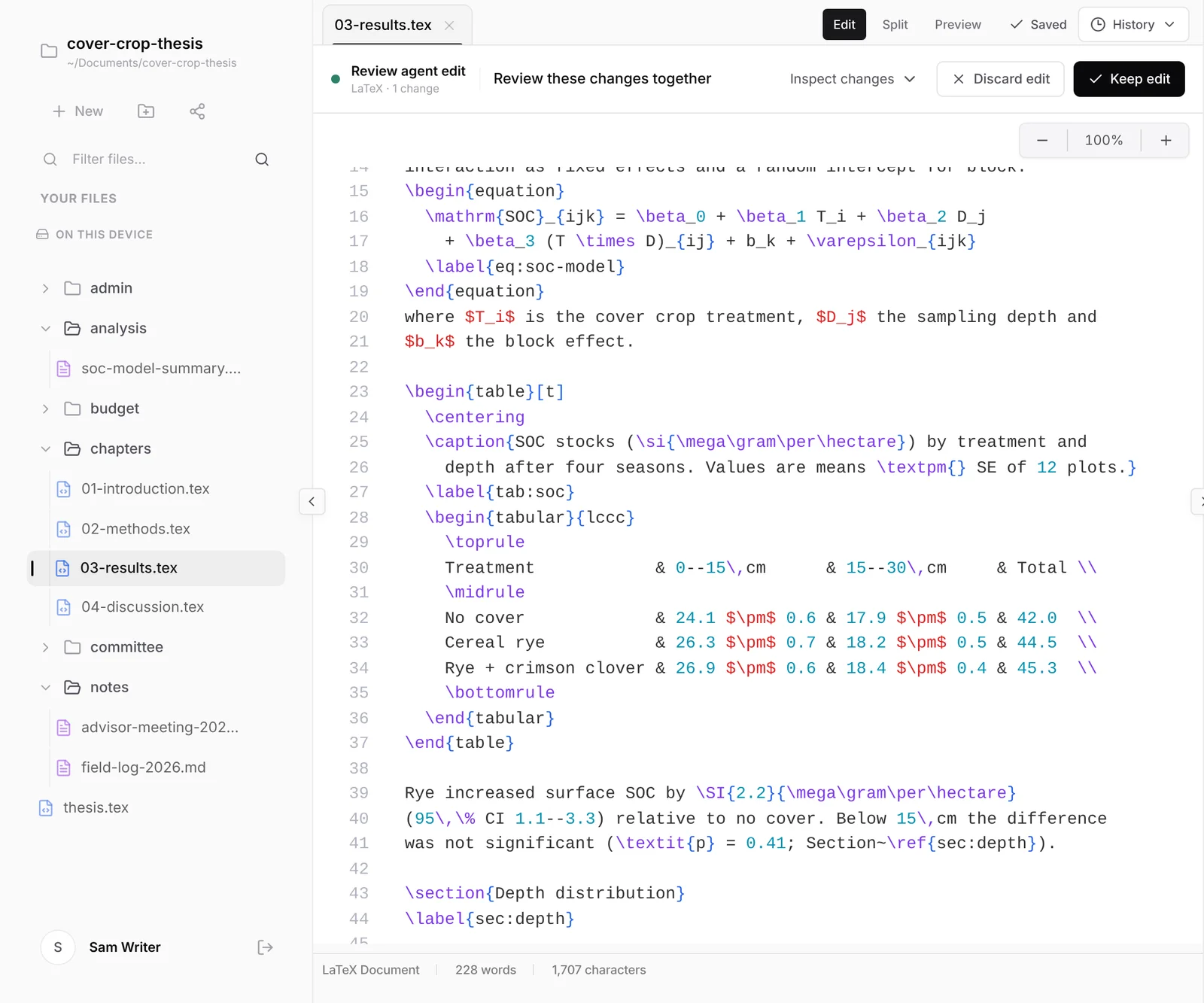
You should see a Review agent edit bar on the chapter with the changed lines, which you can accept or reject one at a time, and a list of sentences the agent could not match in the agent pane.
To check how a page came out, point the agent at the source lines:
Prompt
Look at the compiled page for lines 23 to 37 of @chapters/04-results.tex.
Tell me whether the table fits the text width and whether the caption is
above the table. Do not edit anything.
You should see the agent compile the project, look at the page those lines produced, and report what it found, with no file changes.
For a compile error, ask for an explanation and the smallest fix before any edit, as in the errors guide.
Prompt
Check every \ref and \cref in @chapters against the \label commands in the
project. List references to labels that do not exist and labels that are
never referenced. Do not edit anything.
You should see two lists in the agent pane and no review bar.
Finding new papers and adding them to references.bib uses academic search, which is a Pro feature. Check every author, title, year and DOI the agent adds against the source.
Your request and the parts of your documents the agent needs are sent to our servers and our AI provider. Your files stay in your folder.
Related
- Common LaTeX errors and how to fix them
- Convert a LaTeX chapter to Word for a coauthor
- Nebula Writer vs. Overleaf
The editor is free forever with a monthly AI allowance. Pro is $25 a month for more AI. Download Nebula Writer.