Guide
Keep or discard: how to check every AI edit to a document
Every agent change waits for your decision. How to check it in Word, Excel, PowerPoint, LaTeX and Markdown files, and how Discard puts the file back.
- Nebula Writer Team
- August 31, 2026
- 5 min read
- Updated October 14, 2026
When the Nebula agent edits a file, the change waits for your decision. Keep edit keeps it. Discard edit puts the file back exactly as it was. This guide shows what the review bar tells you, how to check a change in each format, and how to undo a change later.
What happens to the file
The agent writes its changes into the file while it works, and Nebula Writer saves a restore point first. So if another app opens the file before you decide, it sees the agent's version.
When the agent finishes, a review bar appears above the document. If you discard, Nebula Writer restores the original from the restore point, byte for byte. If the file changed after the agent's edit, for example because you edited it in another app, Discard will not overwrite your newer version.
1
The agent edits the file
Nebula Writer saves a restore point first, then writes each change into the file.
2
The review bar appears
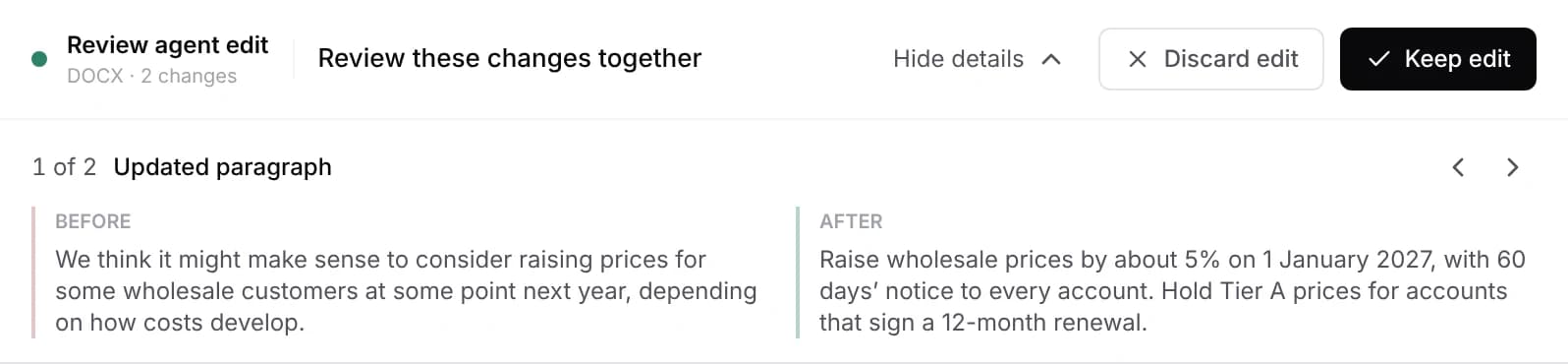
It names the format and the number of changes. Inspect changes shows each one with Before and After.
3a
Keep edit
The change stays in the file.
3b
Discard edit
The original comes back from the restore point, byte for byte.
We test this. In one review-flow check, a Markdown file read "The result is preliminary." An edit changed that line to "The validated result is ready for review." After Discard, the file was identical to the original, byte for byte. The same check passes for LaTeX, Word, PowerPoint and Excel files.
Read the review bar
The bar's title says what kind of change is waiting. Under it you see the format and the number of changes, for example "PowerPoint · 3 changes".

| Title | What happened | Buttons |
|---|---|---|
| Review agent edit | The agent changed a file | Discard edit / Keep edit |
| Review workbook edit | The agent changed a spreadsheet | Discard edit / Keep edit |
| Review new file | The agent created a file | Discard file / Keep file |
| Review file deletion | The agent deleted a file | Restore file / Keep deleted |
| Review agent action | One request changed several files | Discard all / Keep all |
Inspect changes opens a list of the individual changes, each with a Before and an After column. With the bar focused, press Y to keep and N to discard. Use J and K, or the arrow keys, to step through changes.
While a change is waiting, PDF export is paused. The app asks you to review the changes first.
Check a change in each format
Word, Excel and PowerPoint edits are kept or discarded as one decision. You can inspect each change, but you cannot keep some and drop others. Markdown, LaTeX and plain text are different: each change can be accepted or rejected on its own.
Word
Open Inspect changes and read the Before and After text. Then look at the page itself: spacing around the edit, page breaks, table widths, headers and footers. For contracts, or files with complex tracked changes, fields or macros, do a final check in Microsoft Word before you send them. See the Word editing guide.
Excel
The bar reads Review workbook edit. Click the changed cells and read the formula bar, not only the displayed value. Check the totals and charts that depend on those cells. The AI spreadsheet editor page shows the kinds of edits to expect.
PowerPoint
Look at the whole slide, not only the edited text box, and scan the thumbnails for slides that shifted. A moved shape can cover another one. The PowerPoint editing guide has a checklist.
LaTeX
Compile and look at the PDF as well as the changed lines. Accept the lines that are right and reject the rest, then compile again.
Markdown and text
Step through the changes and accept or reject each one.
Ask for changes that are easy to check
A small, clearly scoped edit is easier to verify than a broad one. Ask for findings first when the document is new to you:
Prompt
Review the Executive Summary of @client-report.docx against
@sources/findings.xlsx. List every claim that the workbook does not support.
Do not edit the document.
You should see a list in the agent pane and no review bar, because nothing changed.
Then allow one bounded edit:
Prompt
Revise only the second and third paragraphs of the Executive Summary using
the supported findings. Keep every number, table and heading style.
You should see one Review agent edit bar. Open Inspect changes, and if the agent touched anything outside those two paragraphs, discard and ask again with tighter limits.
Undo a change, now or later
| Situation | What to use |
|---|---|
| The change is still waiting | Discard edit in the review bar |
| You kept a recent agent change and want it back out | File changes in the agent pane header (or ⌘⇧H / Ctrl+Shift+H outside an editor), then Revert |
| You need an earlier state of the file | History, then Restore points: Compare or Restore |
| The agent deleted a file | Restore file in the review bar. Deleted files also go to the system Trash |
| The loss is broad | Your own backup or version control |
Before a large edit, open History and choose Save a restore point. Restore points cover Markdown, text, LaTeX, Word, PowerPoint, Excel and CSV files. They are stored on your computer, and older automatic restore points may be removed over time. Restoring one file does not change the others in the project.
More detail is in the review and history guide. New to the app? Start with the quickstart, or see what the agent can do in each format.