Guide
AI agent for documents: what it can do in each format
What the Nebula agent edits in Word, Excel, PowerPoint, LaTeX and Markdown files, with three real before-and-after runs and the prompts behind them.
- Nebula Writer Team
- September 5, 2026
- 8 min read
- Updated October 17, 2026
Most AI chat tools hand you text to paste back into your file. The agent in Nebula Writer opens the .docx, .xlsx, .pptx, .tex or .md file in your project folder and changes the file itself. This post lists what it can change in each format, shows three real runs with the exact prompts, and gives you prompts to copy for larger jobs.
How a request works
Open a folder with New Project or Open Folder, open a file, and type in the Nebula Agent pane (⌘L on a Mac, Ctrl+L on Windows and Linux, when the cursor is outside an editor). Type @ to point the agent at other files in the project.
The agent reads what it needs, then edits the file through the format's own structure: paragraphs and tables in Word, cells and formulas in Excel, shapes and slides in PowerPoint, lines in LaTeX and Markdown. It writes each change into the file as it works. When it finishes, a review bar appears above the document. Keep keeps the change. Discard puts the file back exactly as it was.
Word, Excel and PowerPoint edits are kept or discarded as one decision. Markdown, LaTeX and plain text changes can also be accepted one at a time. The review guide covers this in detail.
Your request and the parts of your documents the agent needs are sent to our servers and our AI provider. Your files stay in your folder.
What it can do in each format
Word (.docx)
- Add, rewrite or delete paragraphs and headings, or fix one phrase without touching the rest of the paragraph.
- Insert tables, edit cells and resize a table to fit the page.
- Read comments and tracked changes, reply to or resolve comments, and accept or reject revisions one by one or all at once.
- Add headers, footers, page numbers, links and pictures.
- Change fonts or spacing across many paragraphs at once. It reuses the styles already in the document rather than imposing its own.
- Draft a new document from notes, with headings, lists and tables.
Prompt
In @proposal.docx, list every comment and tracked change by section.
Then accept the revisions that only fix spelling or punctuation, and
leave the rest for me.
You should see the list in the agent pane, then a Review agent edit bar for the accepted revisions. More in the Word editing guide.
Excel (.xlsx and .csv)
- Write or repair formulas, and keep totals as formulas rather than typed numbers.
- Change number formats, borders, column widths and frozen rows without touching the values underneath.
- Add sheets, rows and columns, and add or update native Excel charts.
- Build an analysis sheet with a summary block, a formatted table and a chart.
- Run Python on your computer to analyze data and save CSV files or chart images into the project.
Legacy .xls files can be read but not overwritten. Save an .xlsx copy first. See the AI spreadsheet editor page and the spreadsheet guide.
PowerPoint (.pptx)
- Build a new deck with native tables, charts and speaker notes.
- Move, resize, hide or rewrite shapes, fix overlapping text, and set backgrounds and alt text.
- Add, duplicate, reorder or remove slides, and reuse a slide layout from your own template.
- Update an existing table or chart in place, keeping its frame and colors.
- Change title or body fonts across a range of slides.
- Check slides for shapes off the slide, overlapping text, small fonts, crowded text and pictures without alt text. The agent can also draw the slides as images and look at them.
See the AI presentation editor page, how to edit an existing deck, and Excel to PowerPoint.
LaTeX (.tex and .bib)
- Edit source lines, insert citations using keys from your .bib file, and add figures and booktabs tables.
- Compile the document on your computer, read the log, explain the first error and propose the smallest fix.
- Look at the compiled page that a given range of source lines produced.
Each changed line can be accepted or rejected on its own. See the LaTeX guide and Nebula Writer vs. Overleaf.
Markdown and text (.md and .txt)
- Edit lines, search and replace, and add tables, figures and citations.
- Render a section and look at it.
Changes can be accepted or rejected one at a time. See the Markdown guide.
PDFs and research
PDFs are read-only. The agent can search the PDFs in your project and quote passages with page numbers. It can also search the web and academic databases and add papers it finds to your .bib file.
Three real runs
On October 3, 2026 we ran the agent on three small sample files we built for testing. Each had one known problem. Below are the prompts as typed and what changed in the saved file. Each sample folder also held an archive copy of the file, which is why the prompts mention it. All three archive copies were left exactly as they were. The images are renders of the actual files before and after each run.
Word: a cramped heading
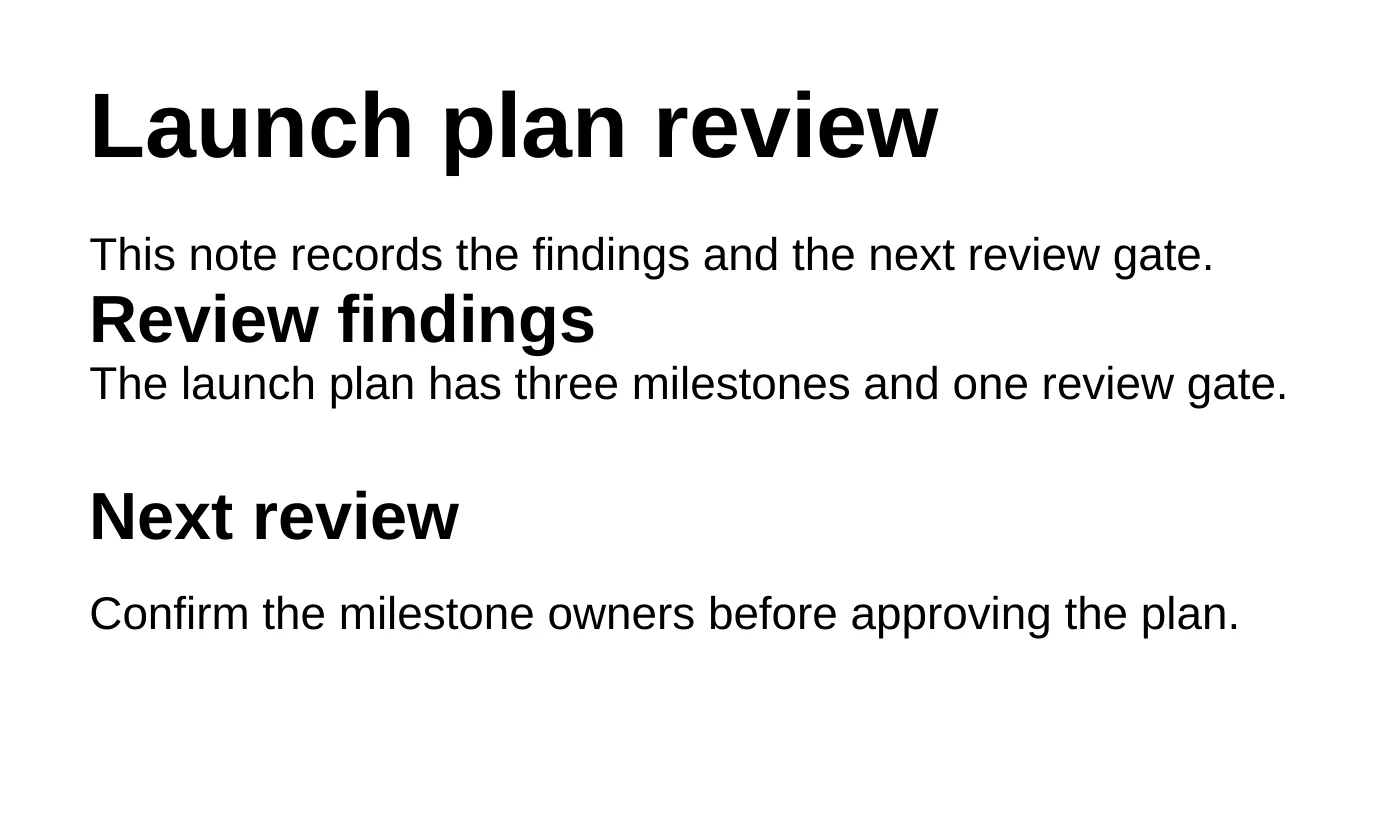
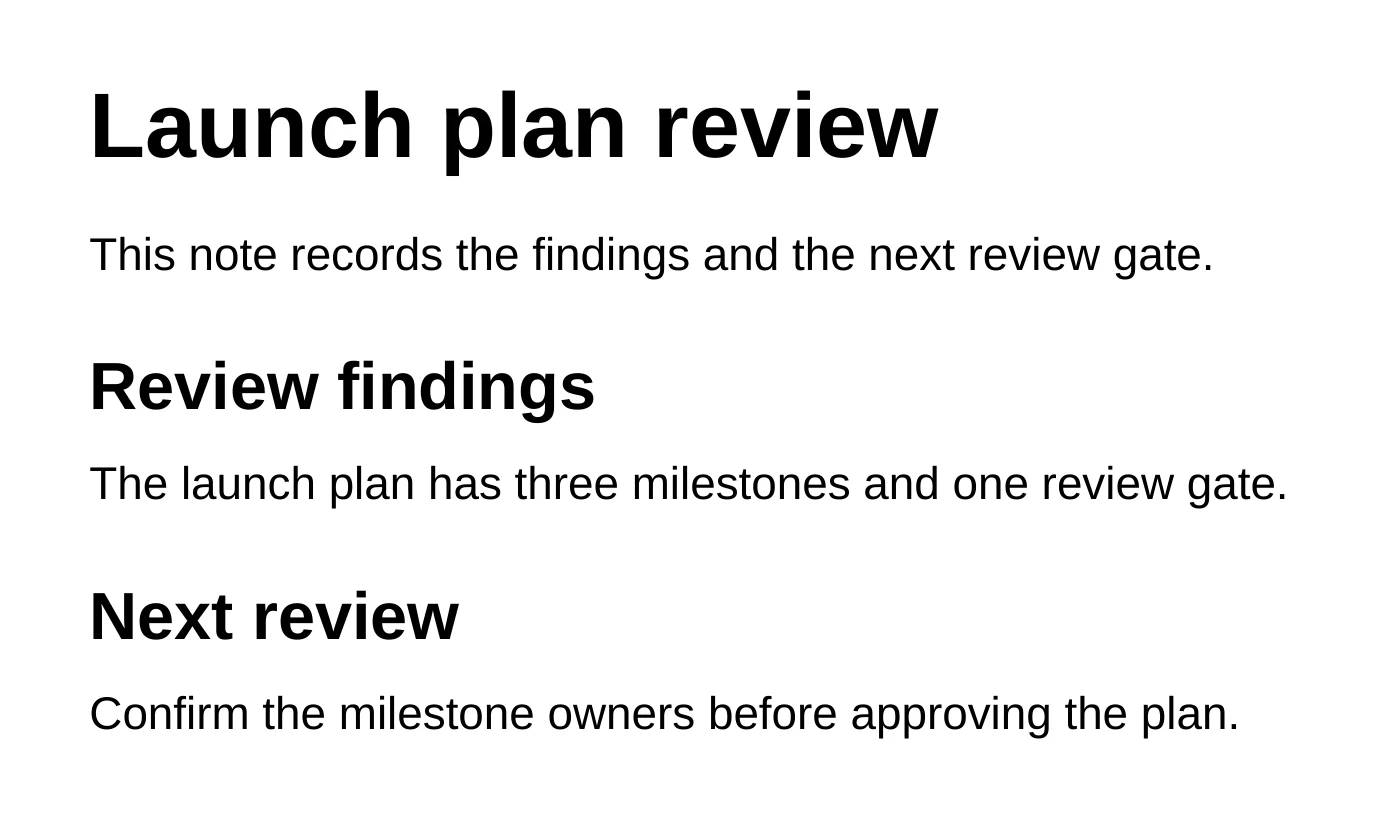
In layout-review.docx, the heading "Review findings" had no space above or below it, while the next heading, "Next review", had 16 pt above and 8 pt below.
Prompt
Review the saved appearance of layout-review.docx and fix the heading
spacing that makes it hard to scan. Keep all wording, typography, and other
layout unchanged. Check the saved result before telling me it is ready.
Leave the archive copy alone.
Result: "Review findings" now has 16 pt above and 8 pt below, matching the other heading. The wording, fonts and every other paragraph are unchanged.
PowerPoint: overlapping text
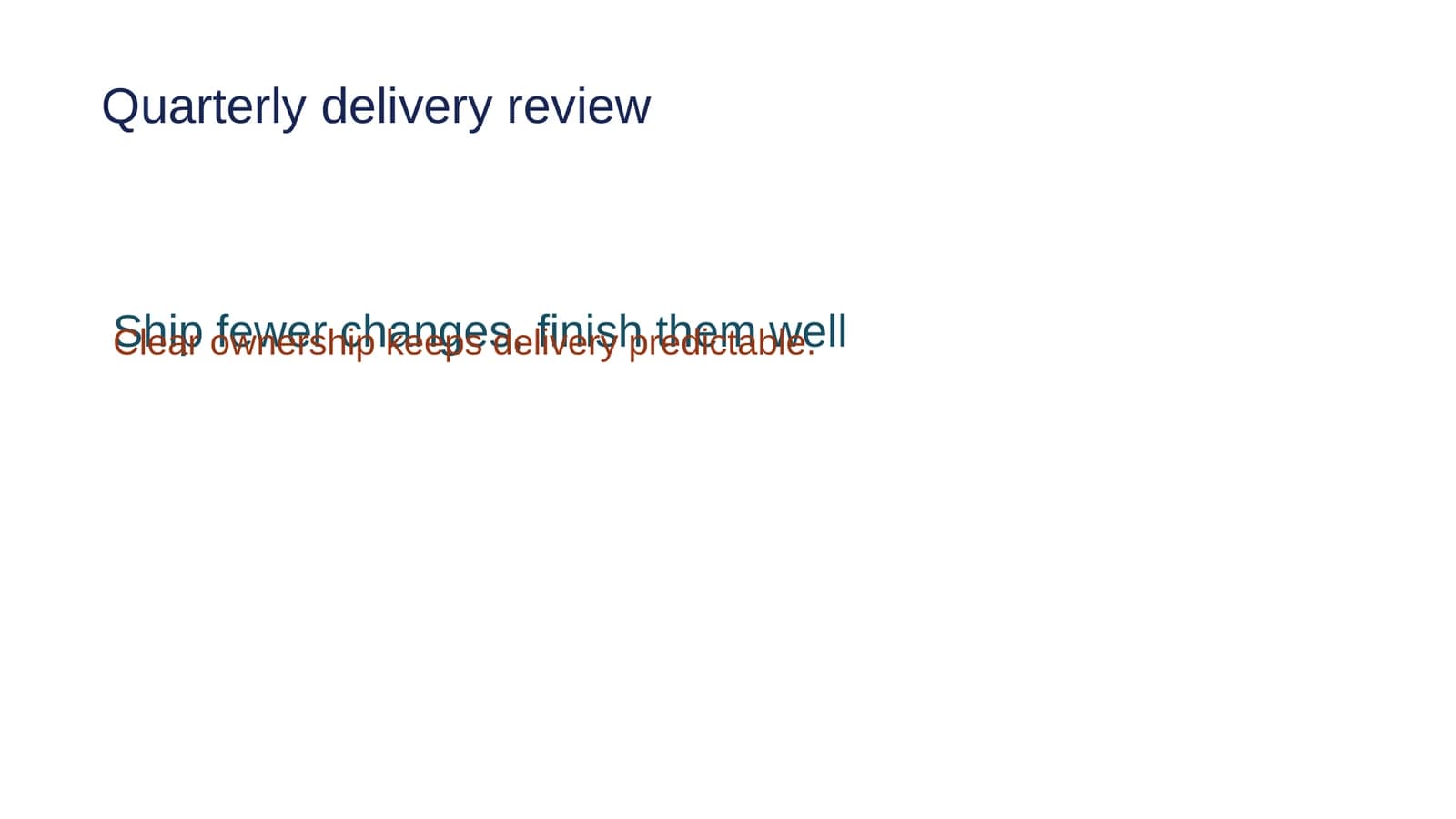
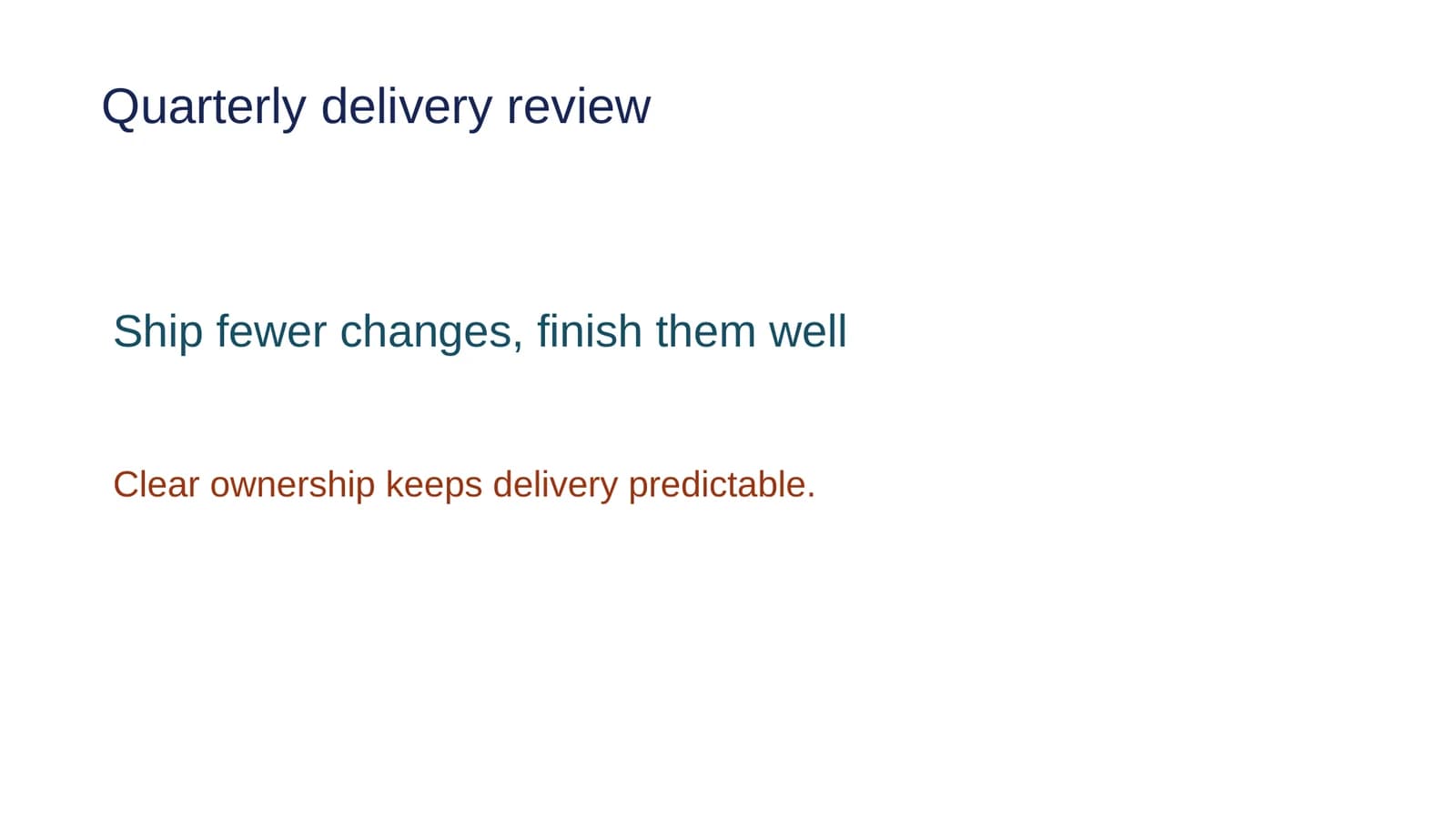
On slide 1 of a two-slide deck, the body text "Clear ownership keeps delivery predictable." sat on top of the headline "Ship fewer changes, finish them well".
Prompt
Review the saved appearance of layout-review.pptx and fix the overlapping
text. Keep all wording, fonts, colors, and text-box sizes unchanged, and
preserve the rest of the deck. Check the saved result before telling me it
is ready. Leave the archive copy alone.
Result: the agent moved the body text box 1.30 inches down. Its size, text, fonts and colors are the same, and slide 2 was not touched.
Excel: a rate shown as a fraction
On the Review sheet, cell B4 ("Conversion rate") held the formula =B2/C2 and displayed 0.125.
Prompt
Review layout-review.xlsx and make the conversion rate display as a
percentage with one decimal place. Keep the formulas, stored values, other
formatting, and workbook layout unchanged. Check the saved appearance before
telling me it is ready. Leave the Archive sheet and archive copy alone.
Result: B4 now displays 12.5%. The formula is still =B2/C2 and the stored value is still 0.125. Only the cell's number format changed, and the Archive sheet is untouched.
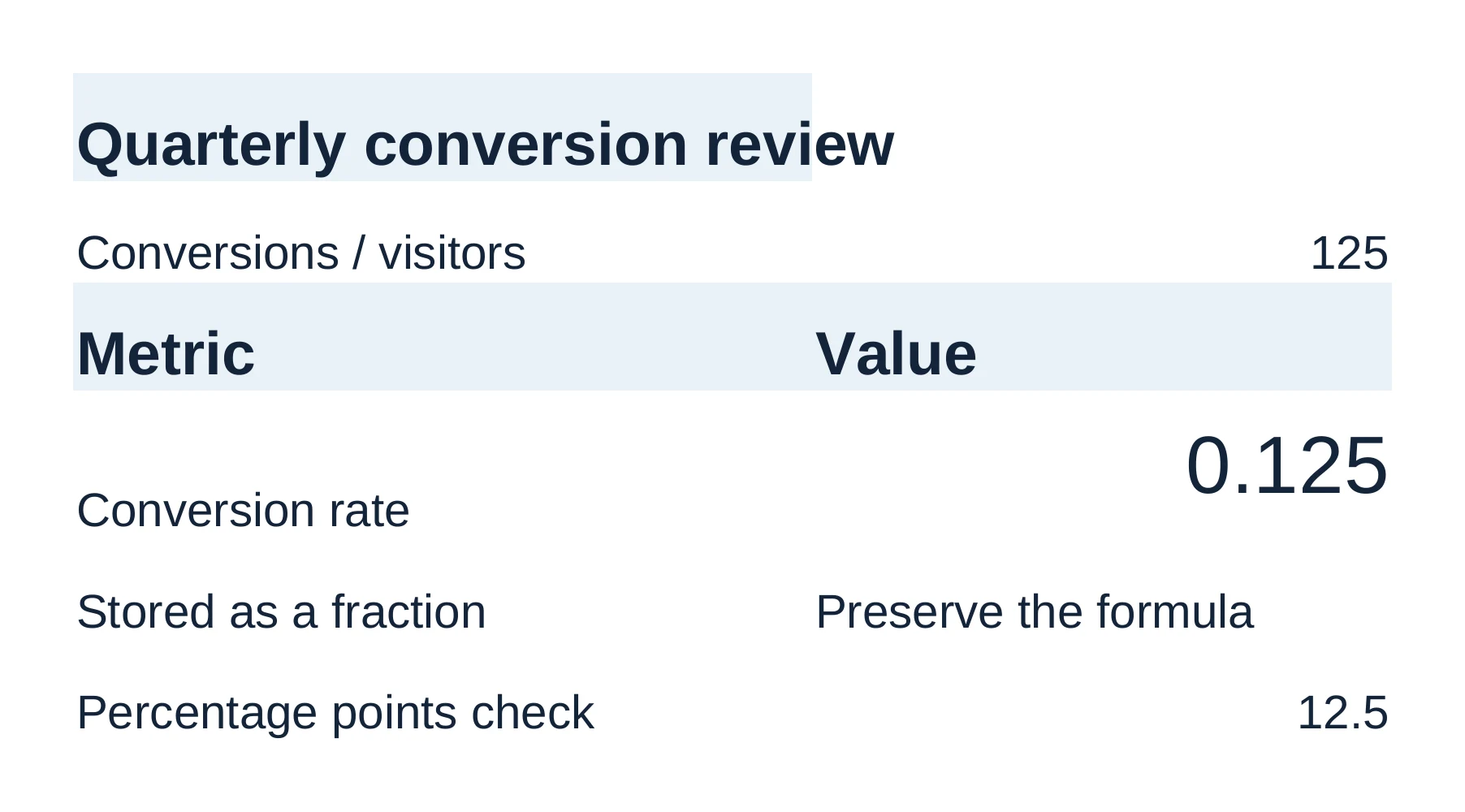
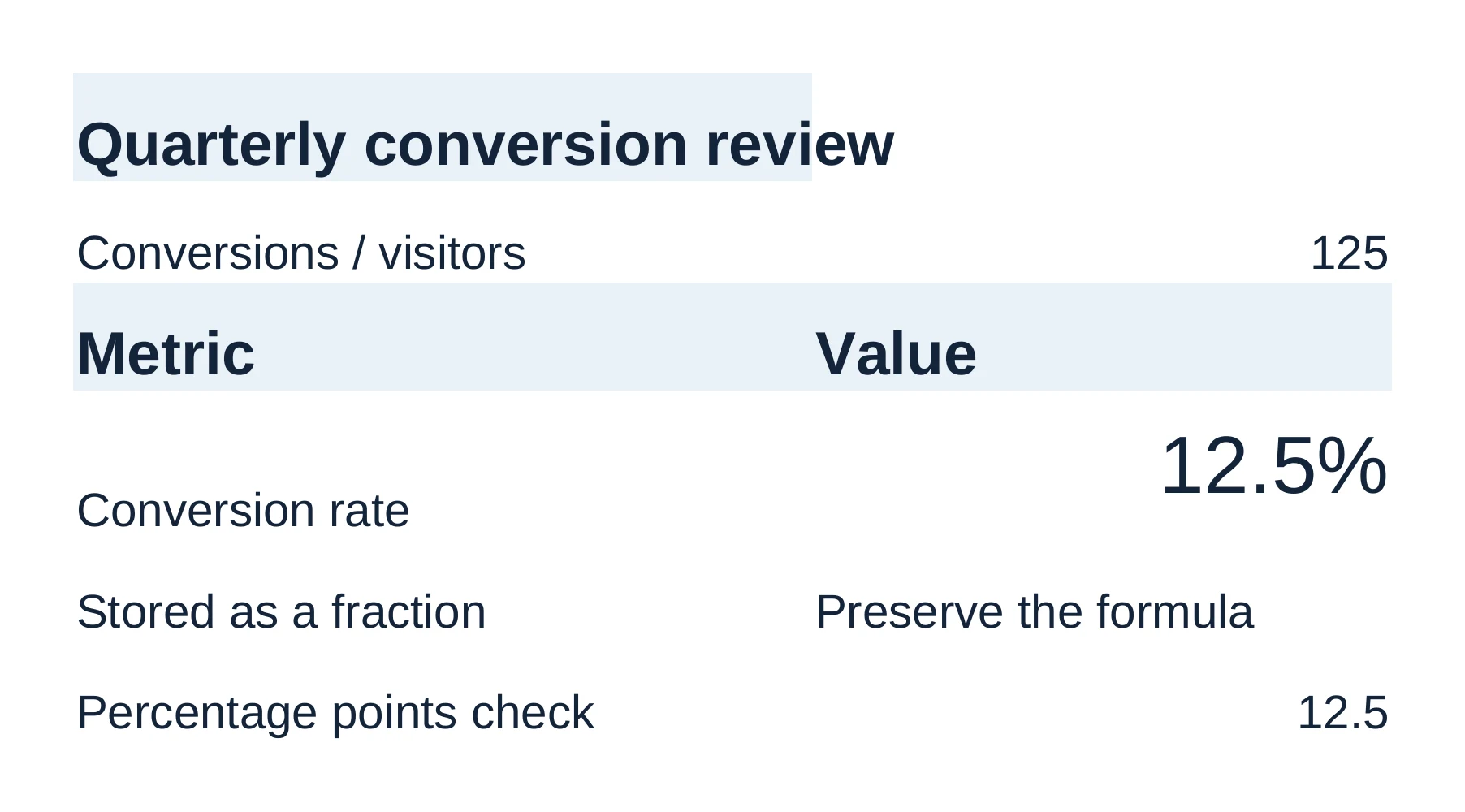
In each run the agent rendered the saved file as an image and looked at it after editing. That is what "check the saved result" asks for.
Two prompts for bigger jobs
Pull findings from several files without changing any of them:
Prompt
Compare @research/interviews.pdf, @data/pilot-results.xlsx, and
@drafts/launch-brief.docx. Treat the workbook as the source of truth for
metrics. List the strongest supported findings, contradictions, and missing
evidence. Cite the source file, page, sheet, or cell range for each finding.
Do not edit any files.
You should see the answer in the agent pane and no review bar, because no file changed.
Turn a workbook into a repeatable analysis:
Prompt
In @operations.xlsx, treat an order as on time when Delivered Date is on or
before Promised Date, and exclude cancelled orders. Create
analysis/on-time-delivery.csv and a 1600×900 trend chart. Save the
calculation code under analysis/ and leave the workbook unchanged.
You should see a CSV file, a chart image and the Python script appear in the analysis folder, with the workbook unchanged. From there you can ask for a Word brief or a deck built from the checked numbers; see Excel to report and the workflow examples.
Before you send anything
Check numbers against their source before you send them. The review guide explains what to look at in each format and how to undo a change you already kept.
Comparing tools? See Nebula Writer vs. Microsoft 365 Copilot and Nebula Writer vs. Overleaf.
The editor is free forever with a monthly AI allowance. Pro is $25 a month for more AI. See pricing or download Nebula Writer.
Questions
What file types can the Nebula agent edit?
The agent in Nebula Writer edits Word (.docx), Excel (.xlsx and .csv), PowerPoint (.pptx), LaTeX (.tex and .bib), and Markdown and text files in your project folder. PDFs are read-only, but it can search them and quote passages with page numbers.
How is an AI document agent different from a chat assistant?
Most chat tools hand you text to paste back into your file. An agent opens the file and changes it through the format's own structure, such as paragraphs and tables in Word, cells and formulas in Excel, or shapes and slides in PowerPoint.