Comparison
Can ChatGPT edit your Word file? How it compares with Nebula Writer
ChatGPT now has add-ins for Word, Excel and PowerPoint, even on the Free plan. What each route does to your file, and when a separate editor makes more sense.
- Nebula Writer Team
- October 5, 2026
- 5 min read
For a long time, getting ChatGPT to change a Word document meant a round trip. You pasted a section into the chat, or uploaded the file, then copied the answer back into Word and fixed whatever headings, numbering and table formatting got lost on the way.
That is no longer the only way. ChatGPT can now reach an Office file from a chat, from inside Microsoft's apps, or through ChatGPT Work, and the route you take decides what happens to the file.
In a chat
Uploading a document is still the quickest way to ask about it: summarize it, find where two sections disagree, or draft a reply from it. For edits it's the weakest route. Whatever ChatGPT hands back still has to make its way into your document, and working out what changed is up to you.
Inside Word, Excel and PowerPoint
This is the route most ChatGPT users should try first. ChatGPT for Word puts a sidebar in Word that drafts from notes, rewrites sections, and adjusts headings, numbering and formatting in the open document. Depending on your plan, it can pull in context from connected apps such as Outlook, SharePoint, Google Workspace and Dropbox. ChatGPT for Excel builds and cleans up sheets, in Excel on the desktop or the web, and ChatGPT for PowerPoint adds and revises slides. Its help page says it is "designed to work within existing presentation templates where possible."
ChatGPT's help center says the add-ins are on every plan, including Free. Because they run in Microsoft's apps, you stay in the program that defines the format, and co-authoring with colleagues keeps working.
The add-in works on the document in front of you. ChatGPT's Word page says it "does not automatically access files on your computer." There is also ChatGPT Work, which can "create or edit documents, spreadsheets, presentations, reports, and analyses," though in the desktop app "PowerPoint is not included in this Work desktop flow at launch."
When you don't have Microsoft's apps
The add-ins need Word, Excel or PowerPoint to run in. Without those apps, or when one request touches several files, Nebula Writer is the better fit. It's a desktop app with its own editors for .docx, .xlsx and .pptx files. You open a folder, and its AI agent edits the files in it: paragraphs, tables, comments and tracked changes in a Word file; cells, formulas and charts in a workbook; slides, shapes and speaker notes in a deck. Type @ to point it at a particular file. It can read and search the rest of the folder while it works, so "update the memo with the totals from budget.xlsx" is a single request.
Here is what an edit looks like inside the file. On October 3 we gave the agent a sample Word document we built for testing, where one heading, "Review findings", had no space above or below it. We asked for the spacing fix and nothing else:
Prompt
Review the saved appearance of layout-review.docx and fix the heading
spacing that makes it hard to scan. Keep all wording, typography, and other
layout unchanged. Check the saved result before telling me it is ready.
Leave the archive copy alone.
When we compared the .docx package before and after, one line had changed:
<w:spacing w:before="0" w:after="0" w:line="240" w:lineRule="auto"/>
<w:spacing w:before="320" w:after="160" w:line="240" w:lineRule="auto"/>
Word measures spacing in twentieths of a point, so the heading now has 16 pt above and 8 pt below, the same as the document's other heading. The wording, style and fonts didn't change.
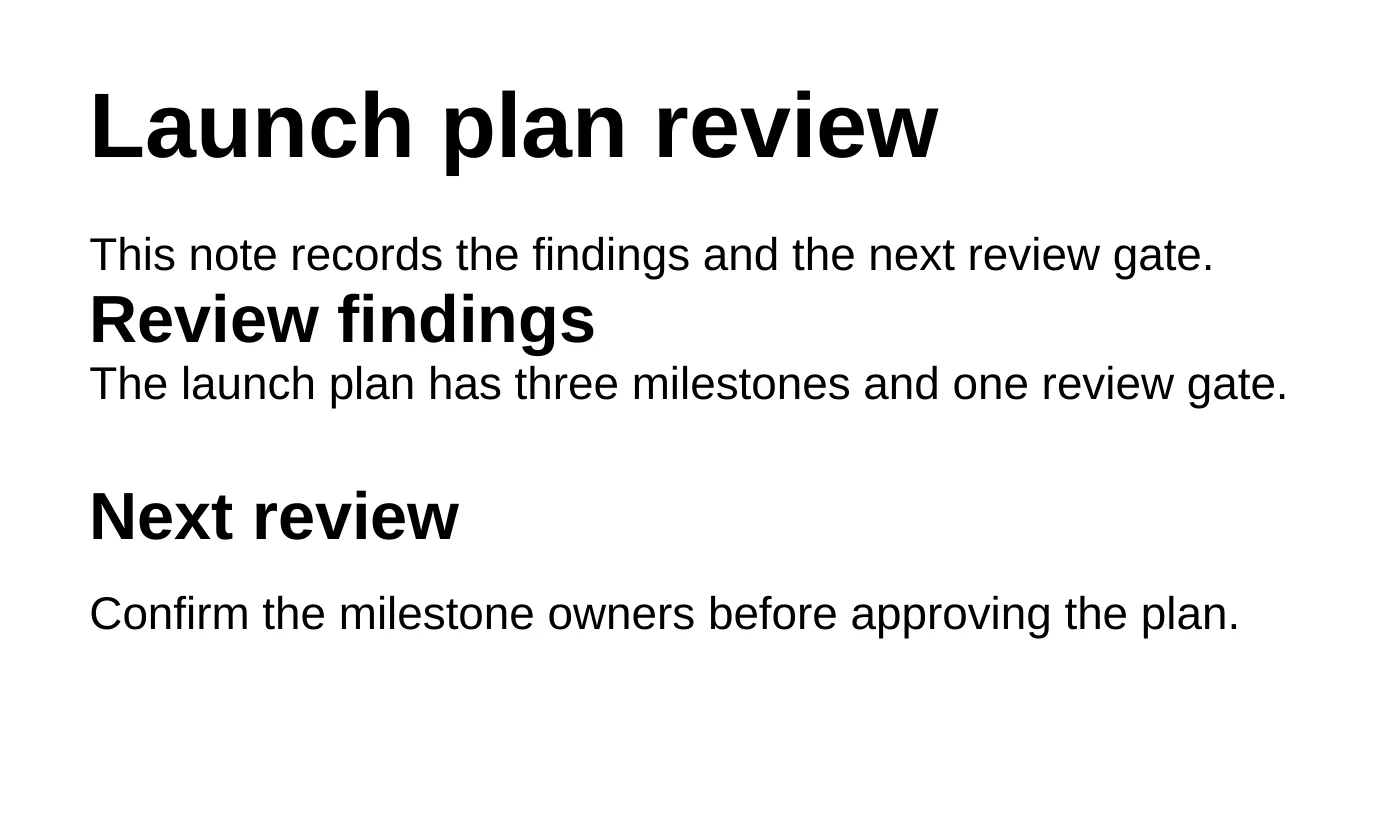
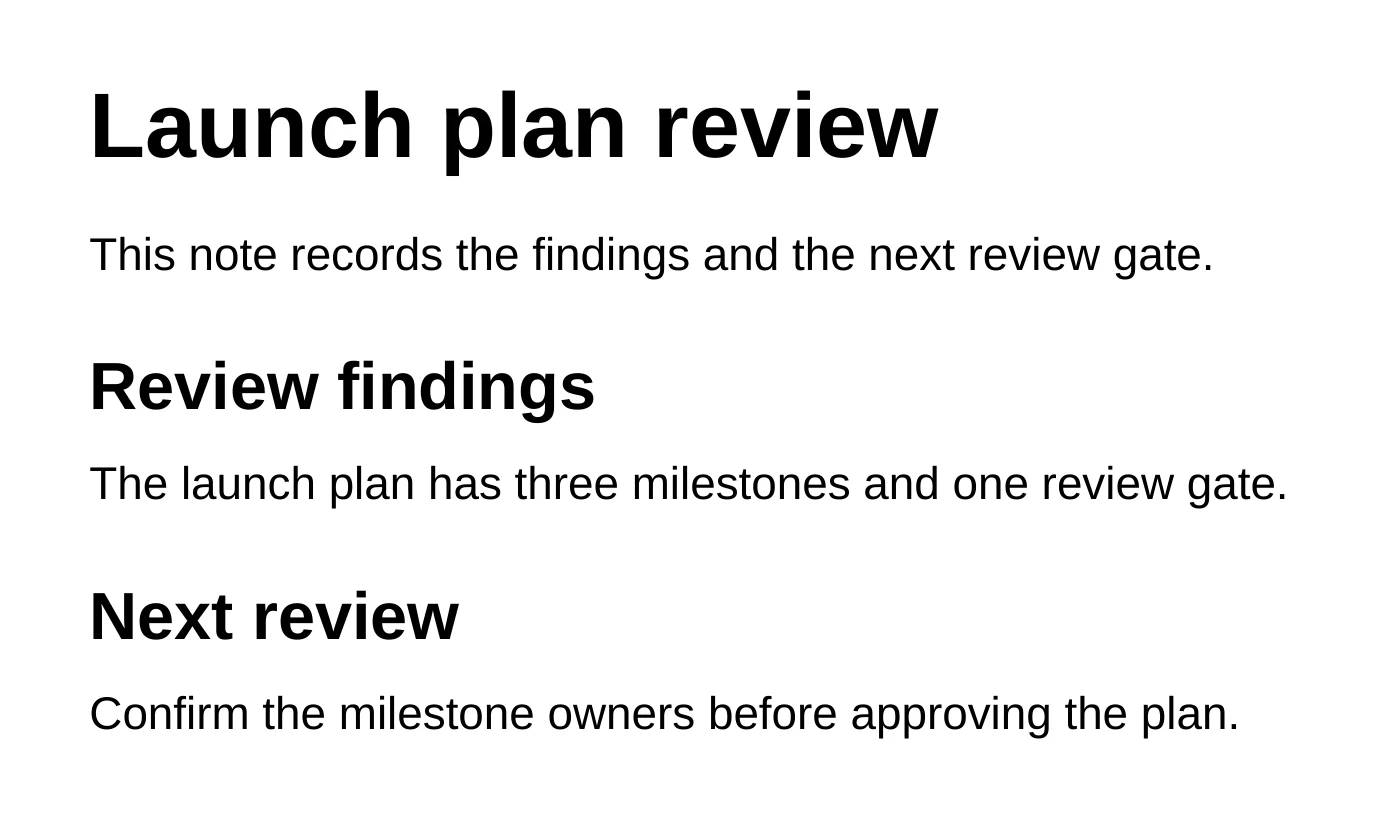
The app saves a restore point before the agent starts, and the edit then waits for you. Inspect changes steps through it, Keep keeps it, and Discard puts the file back exactly as it was. ChatGPT's help center, by contrast, suggests you "duplicate the file first so you can revert if needed." One difference to know: in a Word, Excel or PowerPoint file, Nebula Writer keeps or discards the whole edit. You can't keep half of it.
What it costs
As of October 2026, ChatGPT Go is $8 a month, Plus is $20, and Pro comes in $100, $200 and $500 tiers. On Free and Go, the plans page lists add-in use as limited. Add a Microsoft 365 plan if you don't already have one; our Copilot comparison lists those prices.
Nebula Writer's editor is free, with a monthly AI allowance for the agent. Pro is $25 a month for more AI, and Ultra is $100 a month with four times the Pro allowance. ChatGPT Plus costs less than Nebula Writer Pro and does far more than edit files. Nebula Writer works out cheaper when you don't pay for Microsoft 365, or when the free allowance covers what you do.
Before you try Nebula Writer
It runs on Apple silicon Macs, Windows and Linux, and you sign in with a Google account. The agent runs in the cloud: your request and the parts of your documents it needs are sent to our servers and our AI provider, while the files themselves stay in your folder. Nebula Writer lays out Word pages with its own editor, so if a document has a complex layout, open it in Word before you send it. The Word editing guide lists what to check.
Plenty of people will use both: ChatGPT to think a document through, and Nebula Writer to make the change in the file. The editor is free to download.
Questions
Can ChatGPT edit a Word document directly?
Yes, with ChatGPT for Word, an add-in that puts a ChatGPT sidebar inside Microsoft Word and edits the open document. ChatGPT's Word page says it doesn't automatically access other files on your computer.
Is ChatGPT for Word free?
ChatGPT's help center says the Word, Excel and PowerPoint add-ins are available on every plan, including Free, and as of October 2026 the plans page lists limited use on Free and Go. You still need Microsoft Word to run the Word add-in.
Related
Microsoft, Word, Excel and PowerPoint are trademarks of Microsoft Corporation, and ChatGPT is a trademark of its owner. Nebula Writer is not affiliated with either company.