Guide
Can AI edit a Word document directly? What to check
Stop pasting chat answers back into Word. How an AI agent can edit the .docx in place, what that keeps intact, and how to review the change.
- Nebula Writer Team
- October 14, 2026
- 6 min read
Yes. An AI agent can change a Word document in place, so you stop copying text out of a chat window and fixing the formatting by hand. In Nebula Writer the agent opens your .docx, edits the paragraphs, tables and comments through Word's own file structure, and leaves the rest of the document alone. You then review the change and keep or discard it. No Microsoft 365 plan is needed, and the editor is free to download.
This post explains the three ways AI can touch a Word file, what editing in place keeps intact, how to review the result, and where you should still open Word.
Three ways AI touches a Word file
| Approach | What happens | What you lose |
|---|---|---|
| Paste text back | A chat assistant writes new text. You copy it into Word. | Your time, and often the styles: pasted text brings its own formatting or none. Tables and comments don't come along. |
| Regenerate the file | The assistant writes a brand-new .docx from what it read. | Anything it didn't carry over: your template's styles, headers and footers, comments, tracked changes, section settings. |
| Edit in place | An agent opens the .docx and changes only the parts you asked about. | Little, as long as the change is one the editing tools support. Everything else in the file stays as it was. |
The first two are how most chat assistants work with documents. They read text well, but their output is text or a fresh file. Your document is a package of parts: the body, styles, numbering, headers, footers, comments and more. Rewriting it from scratch is how a carefully formatted report comes back with the wrong fonts.
What "in place" means
When the Nebula agent edits a Word file, it uses operations that work on the document's own structure. It can rewrite one paragraph, replace a single phrase, change a heading's spacing, add a row to a table, reply to or resolve a comment, accept or reject a tracked change, or add page numbers. Each operation touches its target and nothing else.
A few details that matter in practice:
- Existing styles win. When the agent tidies layout, it follows the styles already in the document rather than imposing its own. New paragraphs use your named styles, such as Heading 1 or Normal.
- Replacing a phrase keeps the formatting around it. The new words inherit the formatting of the text they replace, so bold, color and links stay where they were.
- No scripted shortcuts. The agent is set up to change Word files only through these edit operations rather than by running a script that writes the file, so every change can be reviewed.
- It checks the page. The agent can render a saved page as an image and look at it before and after the edit. That is what "check the saved result" asks for in a prompt.
A real example: one line changed
On October 3, 2026 we gave the agent a small sample document we built for testing. The heading "Review findings" had no space above or below it, while the other heading had 16 pt above and 8 pt below. The prompt asked it to fix the heading spacing and keep all wording, typography and other layout unchanged.
We then compared the file before and after the edit. Across the whole .docx package, one line changed, inside the document body:
<w:spacing w:before="0" w:after="0" w:line="240" w:lineRule="auto"/>
<w:spacing w:before="320" w:after="160" w:line="240" w:lineRule="auto"/>
Word stores spacing in twentieths of a point, so 320 and 160 are 16 pt and 8 pt. The heading text, its style, its fonts, every other paragraph and every other part of the file were byte-for-byte the same. The before and after renders, and the exact prompt, are in what the agent can do in each format.
Review the change before you keep it
The agent writes its edit into the file as it works and keeps a restore point first. When it finishes, a Review agent edit bar appears above the page and the changed text is highlighted.
- Choose Inspect changes to step through each change with its Before and After text.
- Choose Keep edit to keep the whole edit, or Discard edit to put the file back.
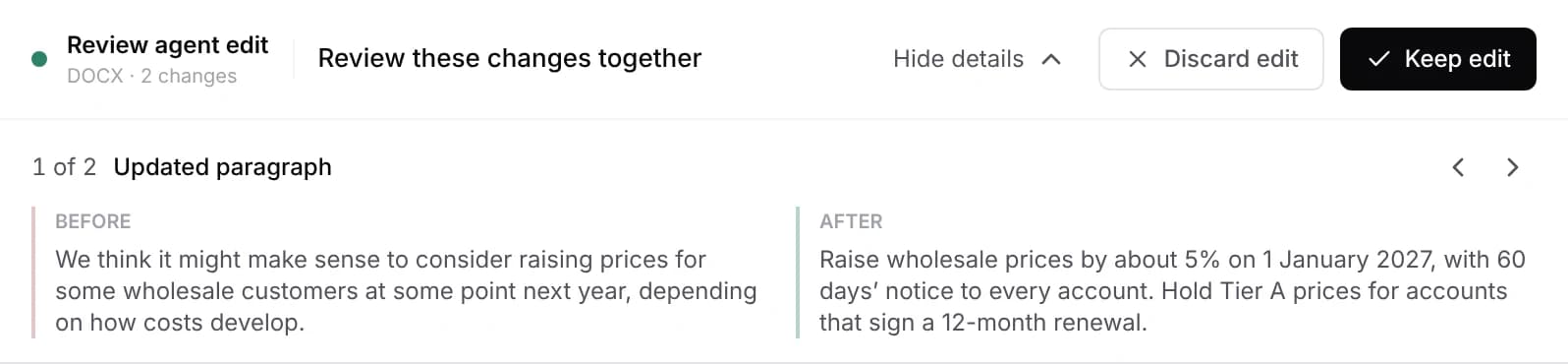
Every change waits for your decision. Discard puts the file back exactly as it was.
A Word edit is kept or discarded as one decision. You can inspect each change, but you can't keep some and discard others. If one part is wrong, discard the edit and ask again with a narrower request. For a longer safety net, open History and choose Save a restore point before a big job. The review guide covers this in depth.
The AI runs in the cloud. Your request and the parts of your documents the agent needs are sent to our servers and our AI provider. Your files stay in your folder.
Three prompts to copy
Ask for findings first, so you can check the agent's reading of the document:
Prompt
Read @contract-draft.docx and list every comment and tracked change by
section. Don't edit the document.
You should see the list in the agent pane and no review bar, because the file has not changed.
Then a scoped rewrite that names what must stay:
Prompt
In @contract-draft.docx, rewrite clause 4.2 in plain English. Keep its
numbering, heading style and defined terms exactly as they are, and don't
change any other clause.
You should see a Review agent edit bar with the clause highlighted. Inspect changes shows the old and new wording side by side.
And a formatting pass that keeps the words:
Prompt
Make the spacing above and below every Heading 2 in @report.docx match the
first Heading 2. Don't change any wording, fonts or other paragraphs. Check
the saved pages before telling me it is ready.
You should see a Review agent edit bar listing the headings whose spacing changed, and the agent's note on the pages it checked.
Limits: when to open Word
Nebula Writer edits the .docx itself, but it doesn't reproduce every Word feature, and its editor lays out pages with its own engine. Open the final file in Microsoft Word before you send it if it has:
- Macros or embedded objects
- Fields, a table of contents, cross-references or footnotes
- Many tracked changes or comments that reviewers will read
- Complex section breaks, columns or floating images
- A strict template or house style
The tools are cautious around these. For example, the operation that replaces an exact span of text refuses spans that cross a field, a tracked change or a drawing rather than rewriting around them. That protects the file, but it also means some requests need a narrower target. The Word editing guide lists what the editor supports.
If you don't have Word at all, see how to edit a Word document without Microsoft 365 for the free options, including Word for the web for a final check.
Related
- Edit a Word document without Microsoft 365
- Nebula Writer vs. Microsoft 365 Copilot
- Keep or discard: how to check every AI edit
Microsoft and Word are trademarks of Microsoft Corporation; Nebula Writer is not affiliated with Microsoft. The editor is free forever with a monthly AI allowance. Pro is $25 a month for more AI. Download Nebula Writer.