Comparison
Nebula Writer vs. Gemini: does your Office file stay an Office file?
Google Docs and Sheets edit a .docx or .xlsx in place, but Gemini in Sheets asks you to convert the workbook first. What that means when the file has to stay in Office format.
- Nebula Writer Team
- October 12, 2026
- 5 min read
Google's help page for Gemini in Sheets has one line that matters if you work in Excel files: "To use Gemini features in an Excel file (.xlsx), select File and then Save as Google Sheets." Saving as Google Sheets makes a copy. Your .xlsx stays where it was, and Gemini works on the new Google file.
For many teams that's fine, because the work is going to live in Google Drive anyway. It matters when the workbook has to go back to a client with its formulas intact, or when the .docx itself is what you hand in.
What Google does with each kind of file
Without Gemini, Google is good with Office files. Docs, Sheets and Slides open a .docx, .xlsx or .pptx from Drive and edit it directly, and Google says "all changes are auto-saved to the file in its original Office format."
Gemini is where it changes. The Sheets help asks you to convert first, as above. Google's pages for Gemini in Docs and Slides describe Google files and don't mention Office formats, so try it on a copy of your own .docx or .pptx before you rely on it.
Inside Google files, Gemini shows its work before anything lands. In Docs it can edit a section or the whole document from a prompt, and you accept its suggestions one at a time or all at once. In Sheets, an action preview card waits for you to choose Apply, with Undo there afterwards. In Slides it generates one slide at a time, which you preview and then insert or use to replace the selected slide.
What Nebula Writer does with the same files
Nebula Writer is a desktop app that opens a folder on your computer. Its AI agent edits the .docx, .xlsx or .pptx in that folder, so there's no conversion and no copy, and formulas in a workbook stay formulas.
On October 3 we gave the agent a sample workbook we built for testing. Cell B4, the conversion rate, held the formula =B2/C2 and showed 0.125. We asked for a percentage:
Prompt
Review layout-review.xlsx and make the conversion rate display as a
percentage with one decimal place. Keep the formulas, stored values, other
formatting, and workbook layout unchanged. Check the saved appearance before
telling me it is ready. Leave the Archive sheet and archive copy alone.
B4 now shows 12.5%. The formula is still =B2/C2, the stored value is still 0.125, and the Archive sheet wasn't touched. The only thing that changed was the cell's number format, and the file is still an .xlsx workbook that opens in Excel.
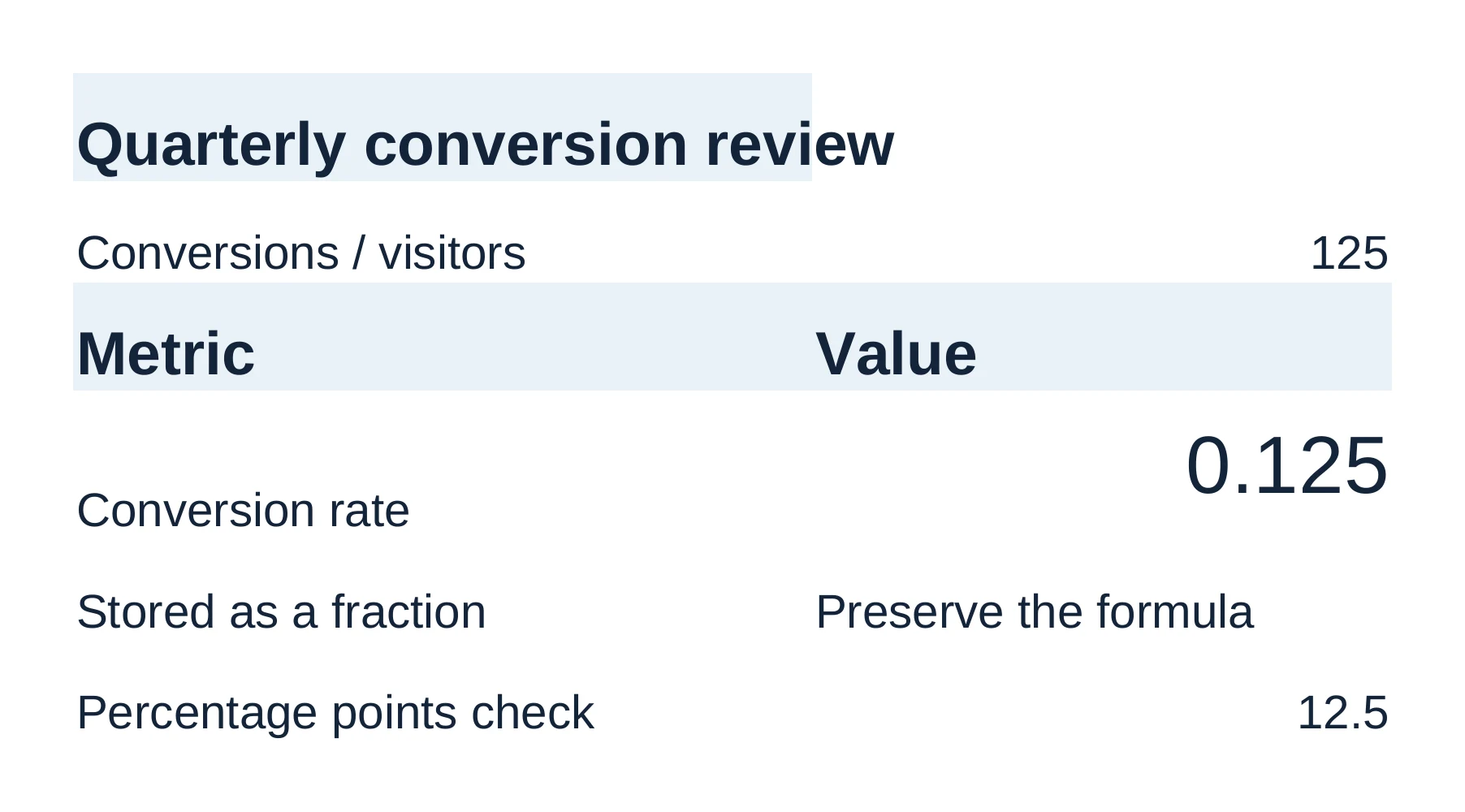
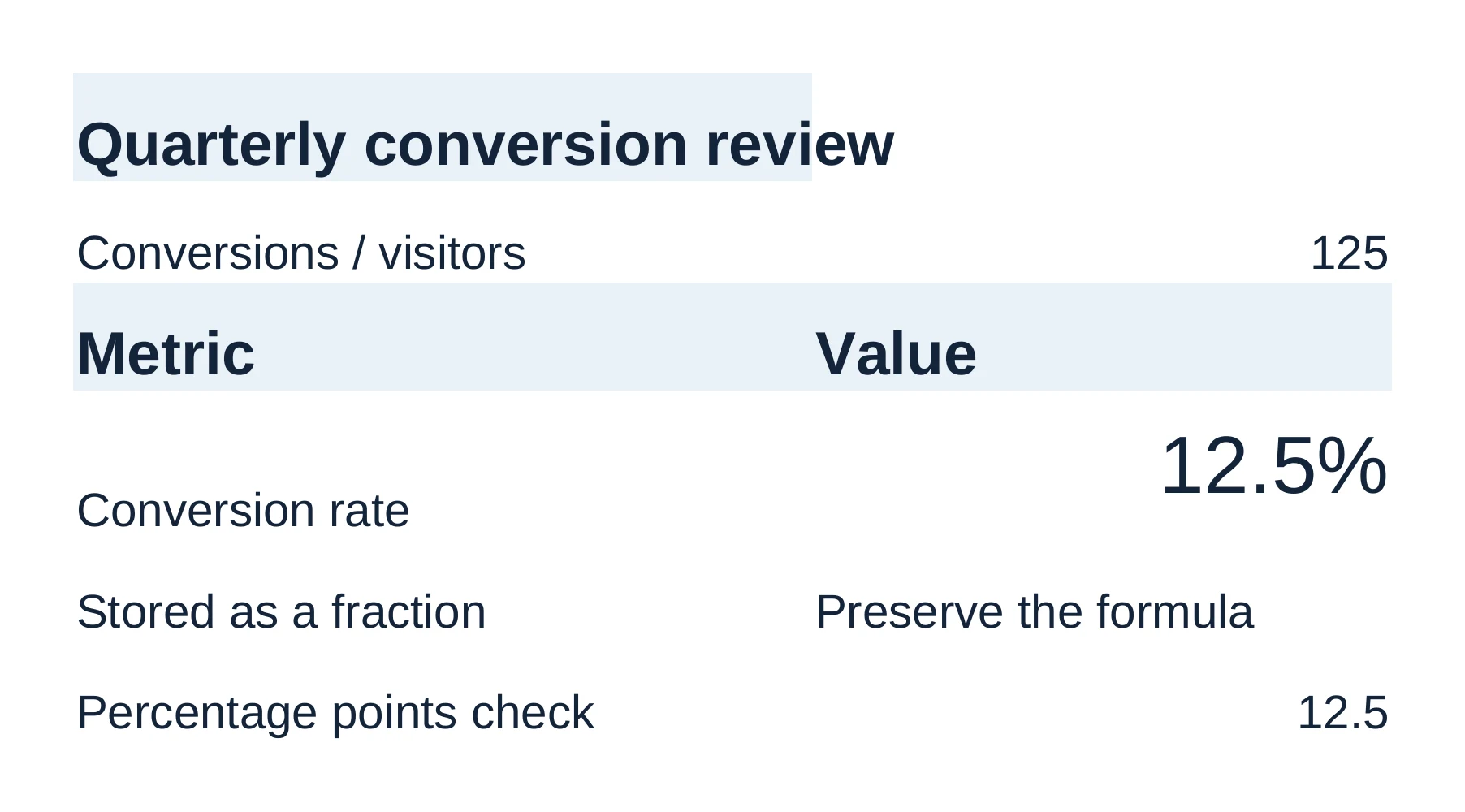
Like every agent edit, that one waited for review. Keep keeps it, and Discard puts the workbook back exactly as it was. Unlike Gemini in Docs, you can't keep part of an edit to an Office file. And Nebula Writer can't calculate every Excel function. A formula it can't recalculate keeps the value saved in the file, and the spreadsheet guide explains the warning you'll see.
The same agent edits Word files (paragraphs, tables, comments, tracked changes) and decks (slides, shapes, speaker notes), reusing the styles already in each file. Type @ to point it at any file in the folder, including LaTeX and Markdown.
Where Google is the better choice
If several people need to edit and comment at the same time, use Google Docs. That works on Office files in Drive too. Nebula Writer has no cloud documents, sharing or live co-editing.
Google also runs in a browser on any computer, with nothing to install. And with Google AI Pro, Gemini's Help me create can draft from your Drive files, emails, chats and the web.
Prices
As of October 2026, for individual US plans. Google's are from its Google AI plans page, and Docs, Sheets and Slides themselves are free with a Google account.
| Plan | Price | What you get |
|---|---|---|
| Google AI Plus | $4.99 a month | Gemini in Gmail and Vids, but not Docs |
| Google AI Pro | $19.99 a month | Gemini in Docs, Gmail and Vids, plus 5 TB of storage |
| Google AI Ultra | $99.99 or $199.99 a month | Gemini in Google apps with the highest limits |
| Nebula Writer Free | $0 | The agent, with a monthly AI allowance |
| Nebula Writer Pro | $25 a month | More AI |
| Nebula Writer Ultra | $100 a month | Four times the Pro AI allowance |
Workspace business plans are priced differently.
Nebula Writer runs on Apple silicon Macs, Windows and Linux. You sign in with a Google account, but your files stay in your folder rather than going to Drive. The agent runs in the cloud, so your request and the parts of your documents it needs are sent to our servers and our AI provider. Because it uses its own editors, check important files in Microsoft's apps before you send them. Download Nebula Writer and try the agent on a copy of one of your workbooks.
Questions
Can Gemini edit a Word or Excel file?
Google Docs and Sheets can edit a .docx or .xlsx stored in Drive and keep it in Office format. To use Gemini in Sheets, Google says to save the Excel file as a Google Sheets file first, which makes a copy. Google's help pages for Gemini in Docs and Slides describe Google files and don't mention Office formats.
Which Google plan includes Gemini in Docs?
For personal accounts, Google lists Gemini in Docs with Google AI Pro, at $19.99 a month as of October 2026, and with Google AI Ultra. Google AI Plus includes Gemini in Gmail but not Docs.
Related
Google, Google Docs, Google Sheets, Google Slides and Gemini are trademarks of Google LLC. Microsoft, Word, Excel and PowerPoint are trademarks of Microsoft Corporation. Nebula Writer is not affiliated with Google or Microsoft.