Comparison
Nebula Writer vs. LibreOffice: a free suite or an AI agent?
LibreOffice 26.8 has no AI, by design. Nebula Writer is built around an AI agent. When each makes sense, and how to use both on the same files.
- Nebula Writer Team
- October 14, 2026
- 4 min read
In September, The Document Foundation put its position plainly: "there will be no AI of any kind in the default installation" of LibreOffice. The August release, LibreOffice 26.8, "contains no generative AI features." The suite is free and open source, needs no account, and once installed it edits entirely on your computer. If that's what you want from an office suite, LibreOffice is the right choice and Nebula Writer is not.
Nebula Writer starts from the other end. It's a desktop editor for Word, Excel, PowerPoint, LaTeX and Markdown files, and its main feature is an AI agent: you describe a change, and it makes it in the file. The agent runs in the cloud. It needs an internet connection and a Google sign-in, and your request and the parts of your documents it needs are sent to our servers and our AI provider. Your files stay in your folder.
The practical differences
From The Document Foundation's post on AI and the download page, as of October 2026:
| LibreOffice | Nebula Writer | |
|---|---|---|
| Price | Free | Editor free; Pro $25 a month; Ultra $100 a month |
| AI | None in the default installation | An AI agent, with a monthly AI allowance |
| Account | Not needed | Google sign-in |
| Internet | Not needed to edit | Needed for the agent |
| Computers | Windows, macOS and Linux, including Intel Macs and ARM builds | Apple silicon Macs, 64-bit Windows and x86_64 Linux |
| Formats | OpenDocument and many Microsoft formats | .docx, .xlsx, .pptx, .tex, .md and more |
LibreOffice "carries no advertising, no telemetry, no subscription, no account requirement." Its Microsoft Store and Apple App Store versions carry a price that supports development, and the software is identical. It also does more as a suite: besides Writer, Calc and Impress there's Draw for diagrams, Base for databases and Math for equations. Third-party extensions can add AI if you change your mind later.
Nebula Writer doesn't open OpenDocument files (.odt, .ods, .odp) or legacy .doc and .ppt files, and it can't overwrite a legacy .xls workbook. If those are your formats, stay with LibreOffice.
What the agent is for
Fixing one cramped heading in LibreOffice Writer takes a few seconds by hand. The agent earns its place when you don't know which of forty headings are off, when a typed total in a workbook should have been a formula, or when the same fix is needed across an entire report. Ask it for a list of problems first, then for a bounded fix.
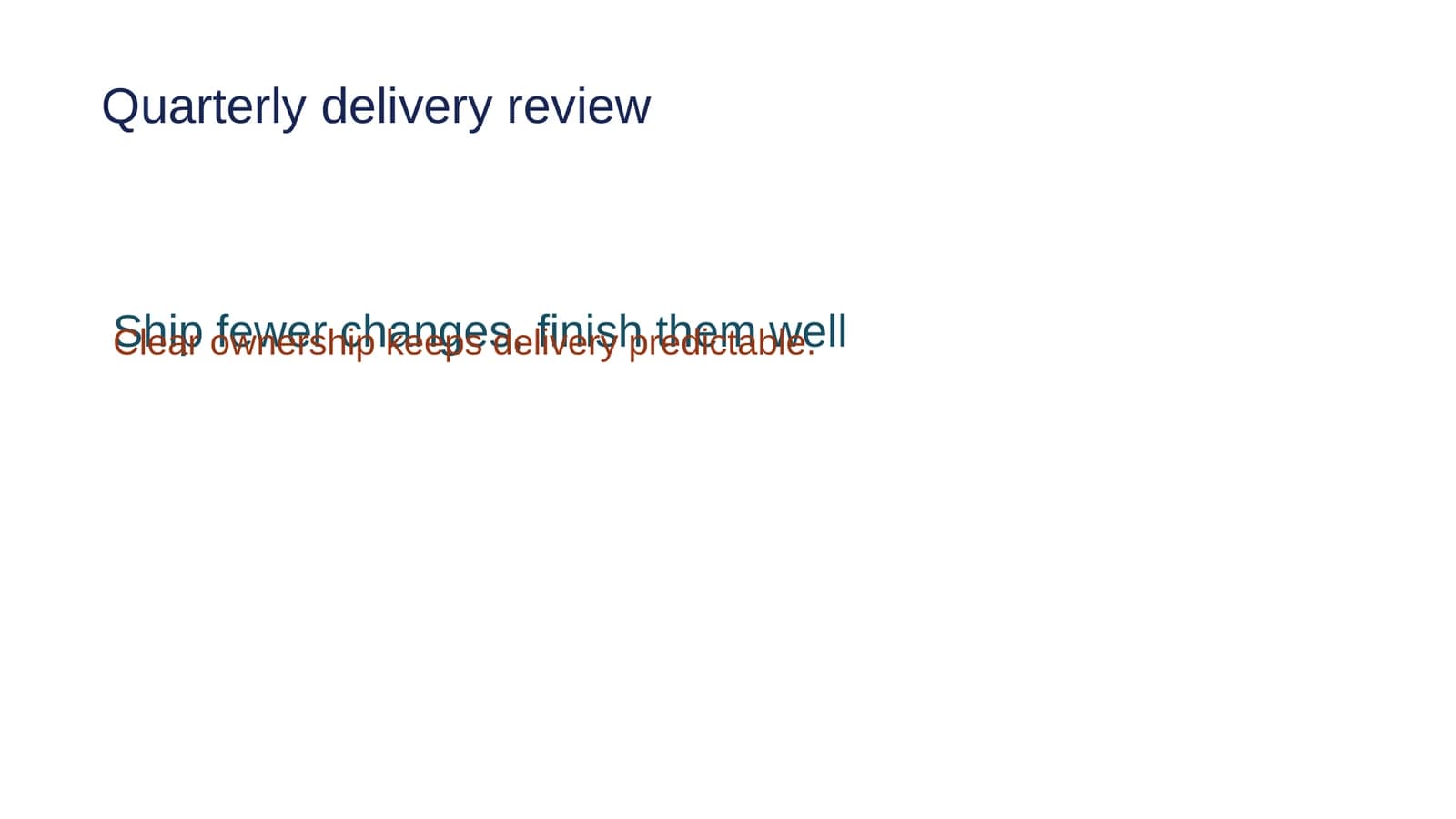
On October 3 we gave the agent a sample deck we built for testing, where the body text on slide 1 sat on top of the headline:
Prompt
Review the saved appearance of layout-review.pptx and fix the overlapping
text. Keep all wording, fonts, colors, and text-box sizes unchanged, and
preserve the rest of the deck. Check the saved result before telling me it
is ready. Leave the archive copy alone.
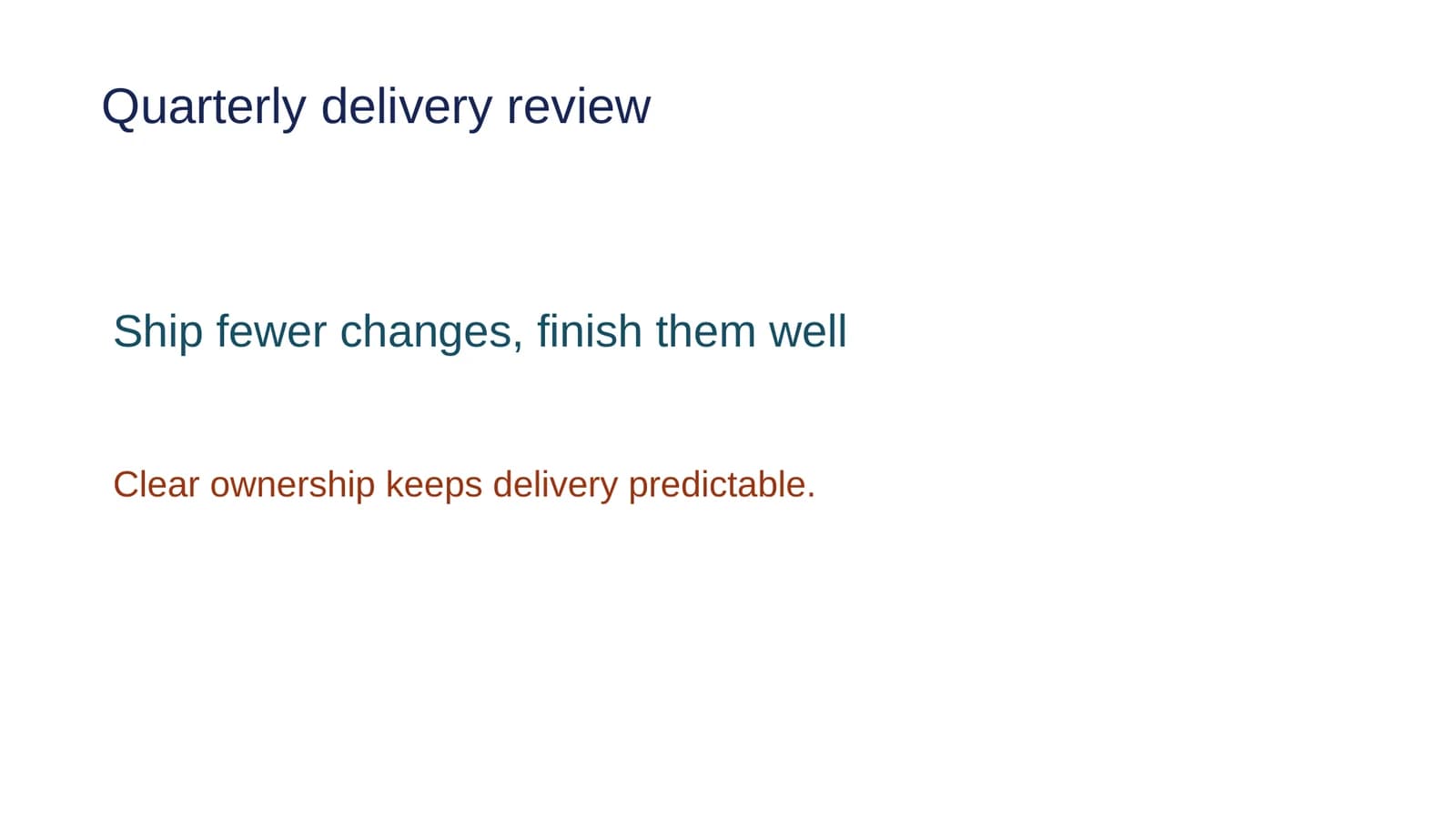
The agent moved the body text box 1.30 inches down, then rendered the saved slide and looked at it to confirm the fix. The box kept its size, text, fonts and colors, and slide 2 wasn't touched.
Every edit waits for you: keep it, or discard it and the file goes back exactly as it was. In a Word, Excel or PowerPoint file that's one decision for the whole edit.
Using the two together
Your files stay ordinary files in a folder, so the same .docx, .xlsx or .pptx opens in both apps. You can draft in LibreOffice and ask Nebula Writer's agent for the tedious pass afterwards, or the other way round. Nebula Writer's editor is free, with a monthly AI allowance, and Pro is $25 a month for more AI. If you already use LibreOffice, download Nebula Writer alongside it.
Where neither matches Word
Every editor other than Word lays out pages its own way, and that's true of both apps. If a file has fields, floating images or tracked changes your reader will see, open the final version in Word, or Word for the web, before you send it.
LibreOffice 26.8 also can't yet draw some newer Microsoft Office chart types. It keeps box-and-whisker, funnel, Pareto, sunburst, treemap and waterfall charts in the file so they return to Microsoft Office intact, but "these charts cannot yet be rendered or edited."
Questions
Does LibreOffice have AI?
Not in the default installation. LibreOffice 26.8 contains no generative AI features, and The Document Foundation said in September 2026 that there will be no AI of any kind in the default installation. Third-party extensions can add AI, and most connect to a model running on your own computer.
Related
- Edit a Word document without Microsoft 365: 4 free ways
- How to edit an existing PowerPoint deck with AI
LibreOffice is a trademark of The Document Foundation. Microsoft, Word, Excel and PowerPoint are trademarks of Microsoft Corporation. Nebula Writer is not affiliated with either.