Guide
Edit a Word document without Microsoft 365: 4 free ways
Four free ways to edit a .docx without a Microsoft 365 plan, where each one is the better choice, and how to have an AI agent edit the file itself.
- Nebula Writer Team
- October 14, 2026
- 7 min read
You can edit a .docx file for free without a Microsoft 365 plan. The four main routes are Word for the web, LibreOffice Writer, Google Docs and Nebula Writer. For the closest match to how Word shows the file, use Word for the web. To work in a desktop app with no internet connection at all, use LibreOffice. If you want an AI agent to make the change inside the .docx for you, use Nebula Writer.
This post compares the four, says where each one fits best, and shows a real edit made by the Nebula agent.
The four free routes
Facts about other products are from their own pages, as of October 2026. Sources are linked in each section below.
| Word for the web | LibreOffice Writer | Google Docs | Nebula Writer | |
|---|---|---|---|---|
| Cost to edit | Free | Free | Free | Free editor with a monthly AI allowance |
| Where it runs | Browser | Desktop app | Browser | Desktop app |
| Saves as .docx | Yes | Yes | Yes, in Office editing mode | Yes, in place |
| Best for | Faithful Word layout, co-editing | Desktop editing with no network | Teams in Google Drive | AI agent edits the file |
Word for the web
Microsoft says you can edit for free in Word, Excel and PowerPoint for the web with a Microsoft account. Files saved to OneDrive open in the browser.
Microsoft's feature comparison lists what the web version leaves out. Macros, and authoring without a connection, are desktop only, and password-protected documents open read-only. Real-time co-authoring works in both.
Choose it when the file must look exactly as it will for a Word user, or when several people need to edit at once. It is Microsoft's own editor for its own format, so it shows the layout most faithfully. Microsoft's AI, Copilot, comes with Microsoft 365 plans; our Copilot comparison covers those prices.
LibreOffice Writer
LibreOffice is free and open source. Its suite includes Writer, Calc and Impress, and it is "compatible with many document formats such as Microsoft Word, Excel, PowerPoint and Publisher." The download page offers Windows, macOS and Linux builds.
Choose it when you want a full desktop word processor that edits entirely on your computer, with no browser, subscription or internet connection needed once it is installed. That makes it the strongest choice for travel and long sessions without a network. Like any editor other than Word, it lays out pages with its own engine, so check complex files in Word before you send them.
Google Docs
Google's help page says that when you upload Office files to Google Drive, you can "edit, comment, and collaborate directly on Office files," and that "all changes are auto-saved to the file in its original Office format." Add-ons, Apps Script and some other features need you to convert the file to a Google Doc, which makes a copy. Google describes Docs as free, and each Google Account includes up to 15 GB of storage shared with Gmail and Photos.
Choose it when your collaborators already work in Google Drive and you want comments and shared editing in the browser.
Nebula Writer
Nebula Writer is a desktop app for macOS (Apple silicon), Windows and Linux. You sign in with a Google account, open a folder with Open Folder, and open the .docx. The editor shows the document as pages, with its margins, headers and footers, and a toolbar for styles, fonts, lists, tables and images. You can edit by hand and save with Cmd/Ctrl+S, the same as any editor.
The difference is the Nebula Agent pane. You describe a change and the agent makes it inside the .docx: paragraphs, headings, tables, comments, tracked changes, headers, footers and page numbers. It reuses the styles already in the document. When it finishes, a Review agent edit bar appears above the page. Inspect changes steps through each change with its Before and After text. Keep edit keeps the edit and Discard edit puts the file back exactly as it was. A Word edit is kept or discarded as one decision.
For how this differs from pasting text out of a chat assistant, see can AI edit a Word document directly?.
Choose it when you want an AI agent to do the editing, without a Microsoft 365 plan. Download it and open your file. Nebula Writer draws pages with its own editor, so a complex Word layout can look slightly different there than in Word.
The AI runs in the cloud. Your request and the parts of your documents the agent needs are sent to our servers and our AI provider. Your files stay in your folder.
A real edit: a cramped heading
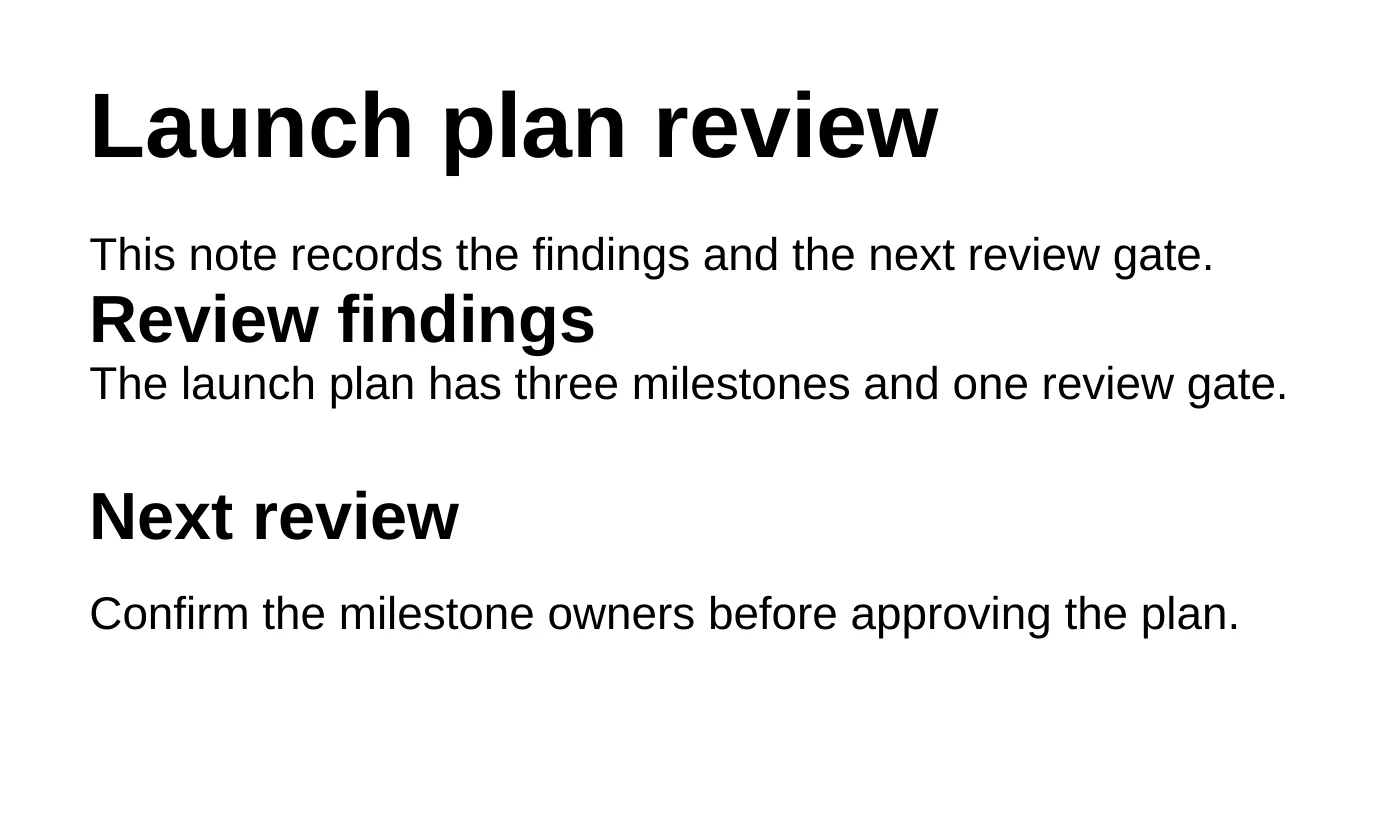
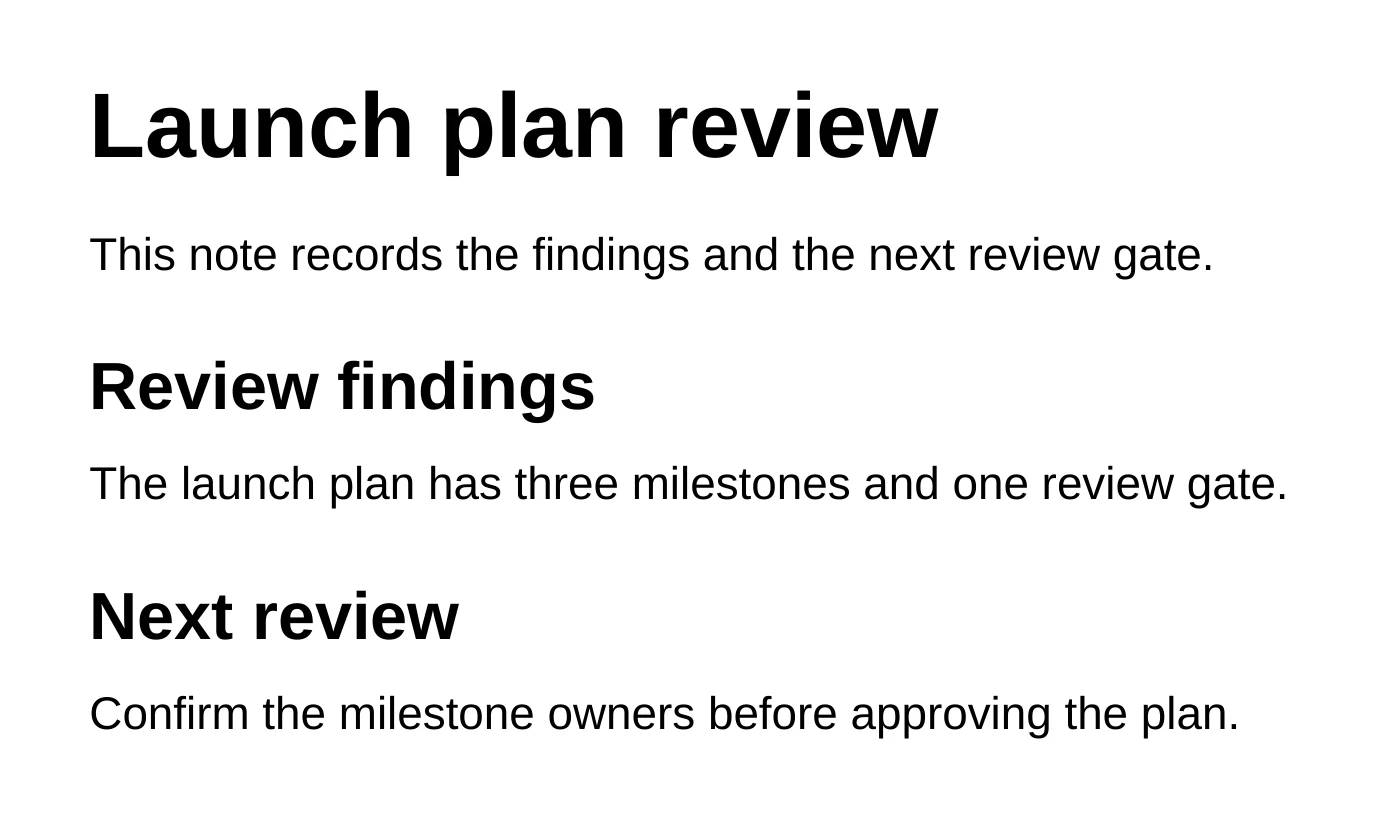
On October 3, 2026 we gave the agent a small sample document we built for testing. The heading "Review findings" had no space above or below it, while the next heading, "Next review", had 16 pt above and 8 pt below. This was the prompt:
Prompt
Review the saved appearance of layout-review.docx and fix the heading
spacing that makes it hard to scan. Keep all wording, typography, and other
layout unchanged. Check the saved result before telling me it is ready.
Leave the archive copy alone.
The agent looked at a render of the saved page, gave "Review findings" 16 pt above and 8 pt below to match the other heading, then rendered the page again to check. No wording or font changed. (The archive copy was a second file in the sample folder, and it stayed exactly as it was.)
Prompts to try on your own file
Start with a check that changes nothing:
Prompt
Look at @report.docx and list headings that use a different style from the
others, paragraphs with uneven spacing, and tables wider than the page,
with the section for each. Don't edit the document yet.
You should see the findings in the agent pane and no review bar, because the file has not changed.
Then ask for a bounded change:
Prompt
In @report.docx, rewrite the Summary section in plain language, under 150
words. Keep the heading, its style, every table, and the header and footer
as they are. Don't change any number elsewhere in the document.
You should see a Review agent edit bar and the rewritten paragraphs highlighted on the page. Choose Inspect changes to compare them with the original.
For a reviewer's markup:
Prompt
List every comment in @report.docx with its section. Reply "Done" to the
comments about typos once you have fixed them, and leave the others for me.
You should see the list in the agent pane, then a Review agent edit bar for the fixes and replies.
The Word editing guide covers the editor, review and PDF export in more detail.
Check before you send
Whichever route you use, open the final file in Word, or Word for the web, if it has fields, a table of contents, tracked changes your reader will see, floating images or macros. Every editor other than Word lays out pages its own way. Keep the .docx as the editable source and send a PDF when the layout must not move.
Have spreadsheets and decks too? See how to edit Excel and PowerPoint files without Office.
Related
- Can AI edit a Word document directly?
- Nebula Writer vs. Microsoft 365 Copilot
- Keep or discard: how to check every AI edit
Microsoft and Word are trademarks of Microsoft Corporation; Nebula Writer is not affiliated with Microsoft. The editor is free forever with a monthly AI allowance. Pro is $25 a month for more AI. Download Nebula Writer.